
Rent a Dragonwilds server
A Dragonwilds server keeps your world on Ashenfall open even when the host isn't playing. Its size follows a simple rule from Jagex: 2 GB base load plus 1 GB per player.
- From
- 5.89 €
- per month
- RAM
- 4–8 GB
- 3 tiers, dedicated
- Location
- Frankfurt am Main
- Xeon Gold 6138
- Ready after
- 16 s
- fresh server, measured
Measured on 15 Nov 2026 on our game server node (server build of 12.11.2026): a fresh RuneScape: Dragonwilds server was ready after 16 seconds and used 722 MiB of RAM at 6 % of one core, empty, without a single player. That's the floor, not the need: players, mods and a growing world push memory up, and that's what the tier is for. How much more it takes with players on our machines we haven't measured yet. Full measurement in the wiki (German) →
RuneScape: Dragonwilds server: tiers and prices
All prices are final prices under § 19 UStG (German small-business rule), billed monthly in advance. No direct debit, no renewal without your payment.
| Tier | Specs | Price |
|---|---|---|
| S4 GB · 3 vCPU · 15 GB | 4 GB · 3 vCPU · 15 GB | 5.89 €/month |
| MRecommended6 GB · 4 vCPU · 20 GB | 6 GB · 4 vCPU · 20 GB | 8.69 €/month |
| L8 GB · 5 vCPU · 25 GB | 8 GB · 5 vCPU · 25 GB | 11.39 €/month |
What you can configure yourself
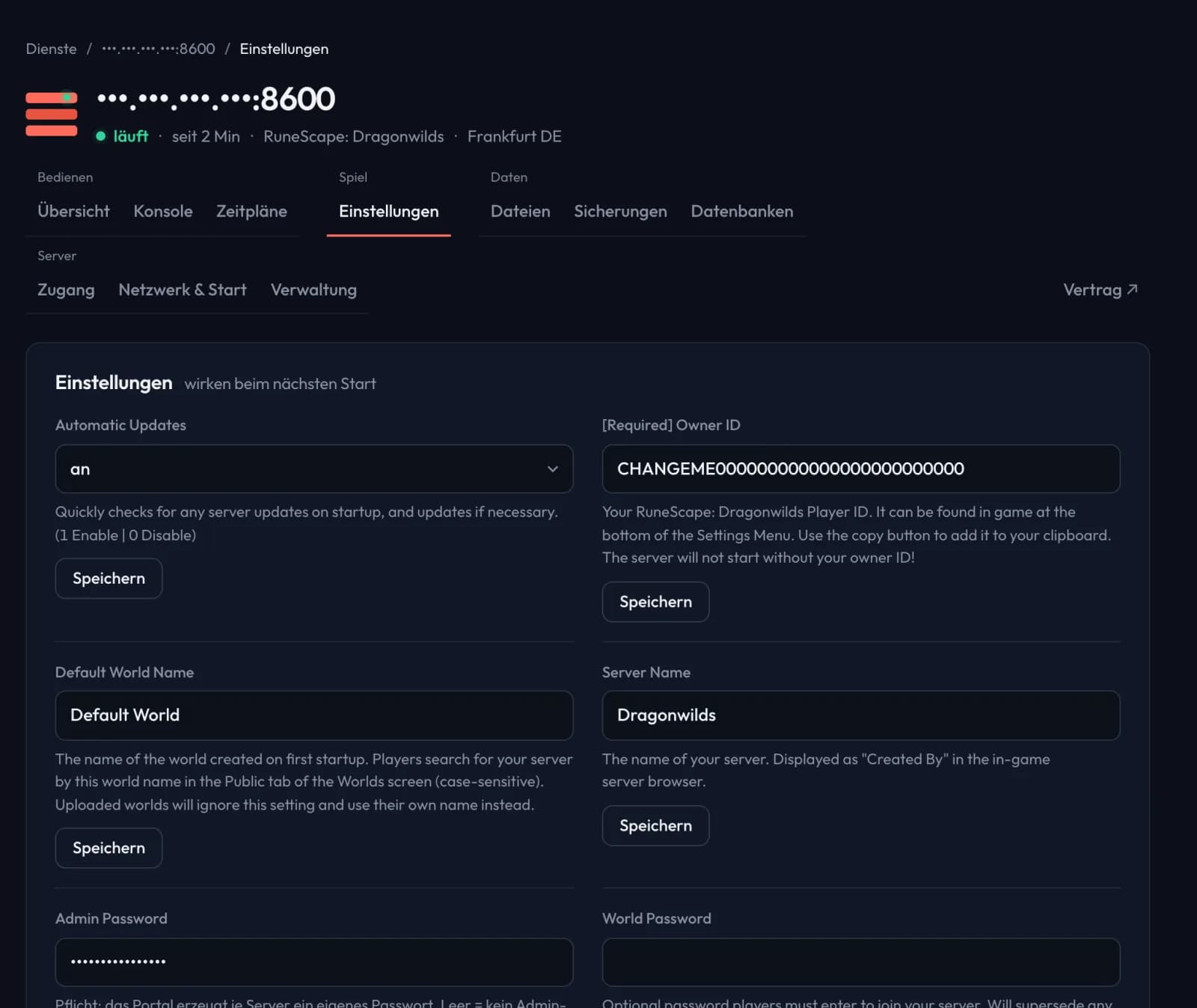
Dragonwilds doesn't have its own settings editor yet. Under “Settings” in the panel you'll find the start values: Owner ID, server name, world name, join password, admin password, maximum players and automatic updates. They apply on the next start. Saves and logs are reachable via the file manager or SFTP.
Three tiers, one formula
Jagex' official guide says: 2 GB plus 1 GB per player, at most six players per server. Our tiers follow that: S for two, M for four, L for six players.
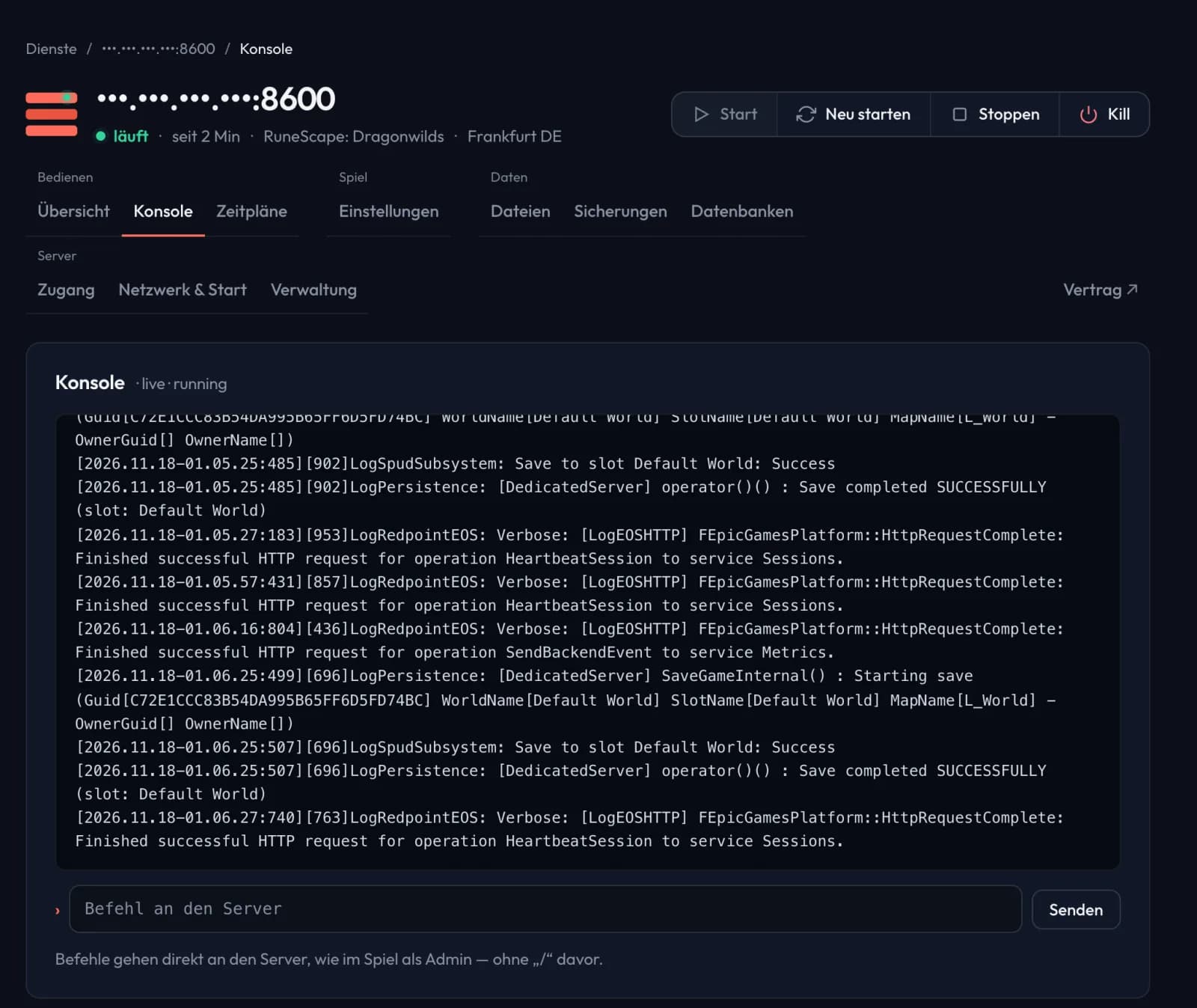
Empty, the server needs much less. Measured on 15.11.2026 on our game server node: ready in 16 seconds, idle at 6 % of one core and 722 MiB of RAM. We haven't measured with players, so the tiers stick to the publisher's figure.
Owner ID and admin password
Without your Owner ID the server has no owner. We start it with a placeholder so it runs right away; you enter your real ID in the panel, then restart. We set the admin password at setup, random and different for every server, so no default password is going around.
Worth knowing: saving on stop
On our servers the world is saved automatically every minute (the game itself only does it every five minutes). On stop it doesn't write again, its log says so; in our test the restart loaded the last automatic save, 11 seconds before the stop. Measured without players. If you stop right after a big build, wait for the next save, at most a minute; the console log then shows “Save completed SUCCESSFULLY”.
The hardware your server runs on
- Processor
- Xeon Gold 6138
- Clock (turbo)
- 3.7 GHz
- Location
- Frankfurt am Main
- Upload
- up to 10 Gbit/s
- Storage
- Mirrored SSD
Included with every server
- Dedicated RAM, no overbooking, no shared reserves
- DDoS protection included
- 8 backup slots: the last 7 nightly ones, plus one for a backup of your own
- Full spec sheet and server console in the control panel
- Provisioning typically under five minutes, fully automatic
- File manager and SFTP access
- Two MySQL databases per server, for plugins and mods
- Schedules for restarts, commands and backups
- Let friends co-manage as a team, with their own login instead of a shared password
Frequently asked questions
How do my friends find the server?
In the game via the server search by world name, which is case-sensitive. The server registers its session with Epic on start; we saw that in the log.
What is the Owner ID, and where do I enter it?
Your player ID from the game, at the bottom of the settings menu with a copy button. Enter it in the panel under “Settings” as “Owner ID” and restart. Until then the server runs with a placeholder and has no owner; only the owner can, for example, lift bans.
Where do I find the admin password?
We set a random one at setup; you'll find it in the panel under “Settings”. In the game it opens the “Server Management” tab under Pause, Settings. Whoever knows the password is admin, so only share it with people you trust. That DedicatedServer.ini shows no entry afterwards is normal: the game removes it on start.
What happens when Dragonwilds updates?
Client and server need the same version. With “Auto Update” on in the panel (default), the server fetches the new version via SteamCMD on every start. After a patch a restart is enough.
Have you tested joining?
No, honestly not. What's measured is install, start, stop, idle load, that the server registers its session with Epic and that packets arrive at the port from outside. We haven't joined with a real game client yet. If it doesn't work, open a ticket.
Do I have to cancel when I want to stop?
No. Billing is monthly in advance: if you don't pay the next invoice, the contract ends with the paid period. You can cancel at any time via “Cancel contract” in the client area, effective at the end of the paid period. After that the server is suspended and deleted three days later, backups included. Download your world from the “Backups” tab first.
More on RuneScape: Dragonwilds
Start your RuneScape: Dragonwilds server
Ordering, provisioning and management all run through the same control panel. If something breaks, you write to a person, not a queue.
Other games
Same hardware, same control panel:
MRMedia provides hosting for this game, nothing more. We are not affiliated with, endorsed or sponsored by the rights holder. You need to own the game separately.